Pryv.io infrastructure procurement
This document is for system administrators provisioning virtual machines and other web resources to run a Pryv.io platform. It guides you through deciding which topology you need, which virtual machines to procure, firewalling, OS compatibility and related operational concerns.
Since Pryv.io v2 (2026) the platform runs as a single binary (
bin/master.js) packaged as a single Docker image (pryvio/open-pryv.io). There is no longer a separateregister,core,hfs,preview,static-webordnsservice to procure — one machine runs everything. Scaling out is done by adding more instances of the same binary and joining them through an embedded rqlite cluster.
Table of contents
- Topology
- Business requirements
- Sizing a core
- System requirements
- Network and firewall
- Operational concerns
- Previous versions of this document
Topology
A Pryv.io v2 deployment is a set of cores. Every core is the same binary — there are no role-specific machines. Cores coordinate through an embedded rqlite cluster that holds the platform DB (user→core mapping, registration tokens, invitations, active-core list).
Single-core (most deployments)
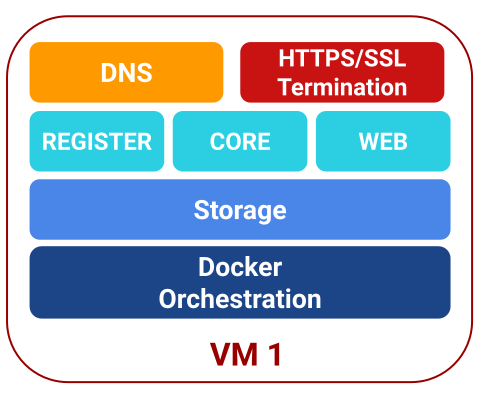
One VM runs bin/master.js, which in turn runs:
- N API workers sharing port 3000 (REST + Socket.IO + registration)
- M HFS workers sharing port 4000 (high-frequency series)
- 0 or 1 Previews worker on port 3001 (image previews)
- An embedded rqlited process for the platform DB
- Either MongoDB or PostgreSQL for user data (can be on the same VM or external)
This mode uses dnsLess.isActive: true — the platform is reached at a single publicUrl. No wildcard DNS or embedded DNS server is needed.
See INSTALL.
Multi-core for load
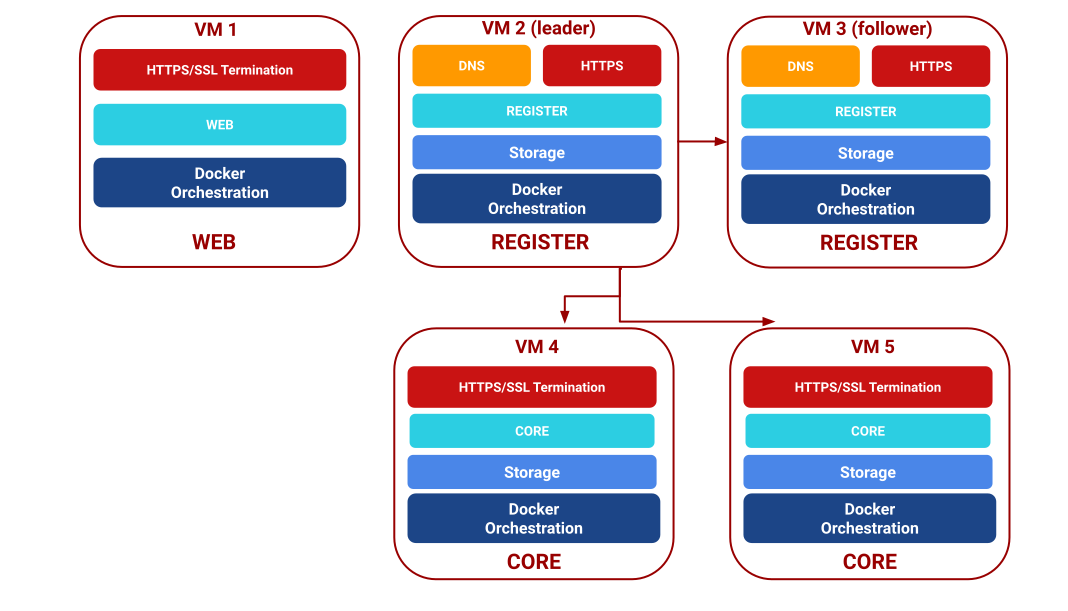
Multiple cores share the same domain (mc.example.com). Each core hosts a subset of users and advertises its identity through rqlite. New registrations are assigned to the core with the fewest users; client SDKs discover the user’s home core via /reg/cores?username={user} and then talk to that core directly.
DNS is either served by each core’s embedded DNS (wildcard *.mc.example.com) or by an external DNS provider (DNSless multi-core). Rqlite peers discover each other through an lsc.{domain} DNS A record.
See single-node to multi-core upgrade and the upstream SINGLE-TO-MULTIPLE.md.
Multi-core for geographical compliance
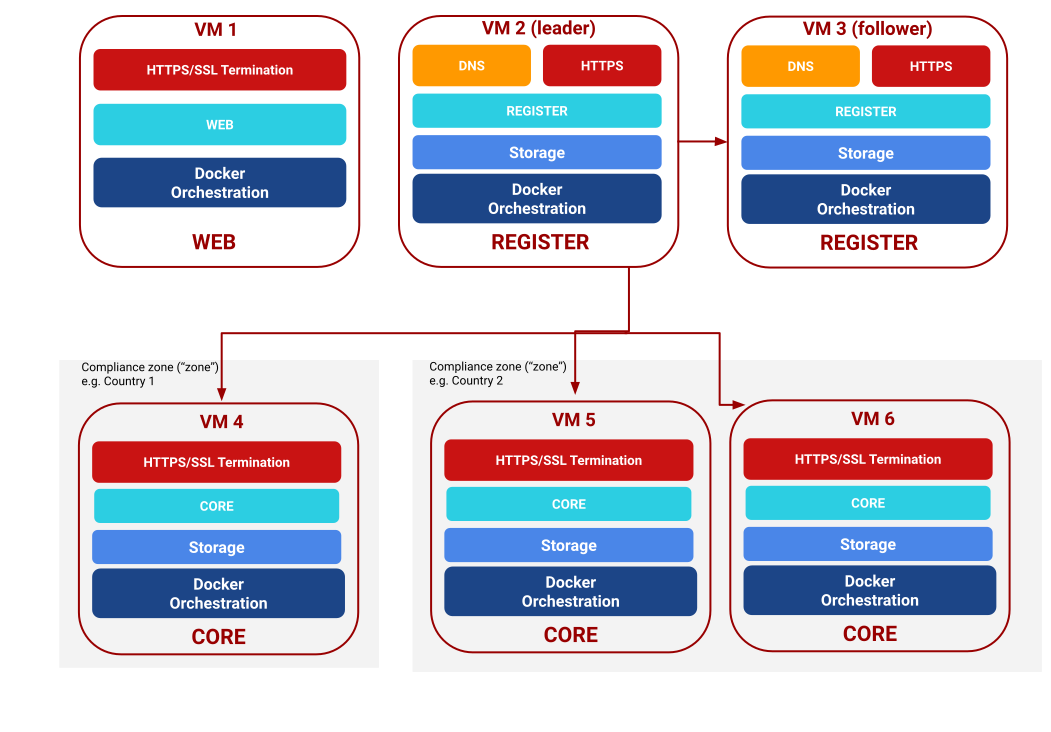
Cores can be placed in different jurisdictions to keep user data where local law requires it. Users registered in a given zone stay on the cores of that zone. The granularity of distribution is always one user account — a compliance zone can contain as few as one user.
If Pryv.io coexists with other server components (e.g. SMTP), apply the same partitioning logic to those components too.
Business requirements
The size of a deployment is driven by business requirements. The tables below list the factors that matter for Pryv.io.
Granularity
Pryv.io’s fundamental entity is the user; data is kept vertically and not spread out. Requirements below are therefore specified per user.
Data production
| Metric | Your values here |
|---|---|
| Expected write requests per second (max rqps) | |
| Attachment writes (max MB/s) | |
| Volume (data points per day) | |
| Volume (MB per day) | |
| Retention of data (years) |
The first two metrics influence the number of users that can be co-hosted on a single core; the last two give you an estimation of disk space consumed per day per user.
Data consumption
| Metric | Your values here |
|---|---|
| Expected read requests per second (max rqps) | |
| Number of points retrieved per request (scalar) | |
| Attachment reads (max rqps) | |
| Volume (data points per day) | |
| Volume (MB per day) |
This table quantifies the load generated by reading data back per user.
Sizing a core
Use the key metrics from the previous section to decide how many cores you need. Inside each compliance zone (or for the whole platform if there’s only one), derive the number of cores from the following maximum values for a single core:
| Metric | Max performance of a single core |
|---|---|
| Write requests per second | 2000 rqps |
| Attachment writes | Depends heavily on network path — roughly speed of underlying storage / 2 |
| Data points per day | Sustained write increases total data points per user, which uses more disk space. |
| Volume (MB per day) | See above. |
| Expected read requests per second | 2000 rqps — latency has a long-tail distribution depending on your query. |
| Number of points retrieved per request | Big (> 10 000 points) result sets should use paging. |
| Attachment reads | 600 rqps |
Consider load distribution across your user base. For a heterogeneous user base, add safety margins to the above numbers.
New users are assigned to the core with the fewest users in the same compliance zone — this produces round-robin behaviour for a stable set of cores. User deletions or newly added cores skew the distribution toward the less-loaded cores until balance is restored.
System requirements
Operating systems
Linux — any distribution supported by your chosen container runtime or Node.js 22. Tested on:
- Ubuntu 20.04, 22.04, 24.04
- Debian 11, 12
Docker
If running from the pryvio/open-pryv.io image:
- Docker v20.10 or later
docker composev2 (optional — the core only needs a single container)
Native (non-Docker) installs need Node.js 22.x.
Per-core machine
| Aspect | Minimal requirement |
|---|---|
| RAM | 4 GB (8 GB recommended; add ~200 MB per extra API/HFS worker) |
| CPU cores | 2 (4+ under load or with image previews) |
| Pryv.io binary + image | 2 GB (Docker image unpacked) |
| Data size | Depending on storage needs (see Sizing a core) |
| Service ports | See Network and firewall |
Load sensitivity:
| Load situation | Resource needs |
|---|---|
| Large data per user | Data disk space — increase per data-usage predictions |
| High requests per second | CPU cores — increase to 4+; raise cluster.apiWorkers |
| High-frequency series | Raise cluster.hfsWorkers; ensure port 4000 reachable from your proxy |
| Image uploads / previews | CPU + RAM — GraphicsMagick + sharp are CPU-bound; enable previewsWorker |
Database host (optional — external PostgreSQL / MongoDB)
When running the base storage engine on a separate machine:
| Aspect | Minimal requirement |
|---|---|
| RAM | 4 GB |
| CPU cores | 2 |
| Data size | Scales with users × retention — plan from the Data production table |
| Service port | tcp/5432 (PostgreSQL) or tcp/27017 (MongoDB) — reachable from the core |
If using embedded MongoDB or PostgreSQL on the same VM as the core, add the database’s resource needs to the core requirements above.
Network and firewall
Inbound — from clients:
| Port | Protocol | When |
|---|---|---|
| 443 | tcp | HTTPS (built-in SSL or behind your reverse proxy) |
| 53 | udp | Only in multi-core deployments using the embedded DNS server |
Inter-core (multi-core only):
| Port | Protocol | Purpose |
|---|---|---|
| 4002 | tcp | rqlite Raft consensus — must be reachable between all cores. Mutually-authenticated TLS by default when cores are added via the bootstrap CLI; a VPN between cores is no longer required as a baseline. |
| 4001 | tcp | rqlite HTTP (usually only bound to localhost) |
Cores added via bin/bootstrap.js new-core ship with storages.engines.rqlite.tls.{caFile, certFile, keyFile, verifyClient: true} enabled — both ends of every Raft connection verify the peer’s cert against the cluster CA. Plain TCP attempts on port 4002 are rejected. If you opt out of mTLS (set tls: null, the default for fresh installs that have never run the bootstrap CLI), opening port 4002 still requires a private network or VPN between cores.
Outbound — from the core:
- tcp/443 for fetching event-type/assets definitions (configurable or pinnable), OAuth callbacks, and SMTP (TLS) if you enable email sending. Legacy deployments running the standalone
pryv/service-mailprocess also need outbound:443to reach it. - tcp/587 or tcp/465 for SMTP (when
services.email.method: in-process, the v2-recommended path), depending on whether your relay uses STARTTLS or implicit TLS.
Operational concerns
System hardening
Follow a system-hardening guide for your chosen OS: firewall defaults, no password SSH, automatic security updates, non-root service user, etc. Administrators of a regulated system must themselves conform to the applicable regulations and have received adequate training.
Backups
See the backup guide. Making a copy of private user data is regulated by law — make sure you understand the implications before rolling out backups.
Node monitoring
Monitor key performance metrics on every core and keep historical data for incident analysis. At minimum:
- Load, CPU (system, user, iowait, idle, load1, load5, load15)
- Disk (space left on devices, read/write iops)
- RAM (swapping activity, reserved, free)
- Network interfaces (packets, bytes, errors)
Application-level: the core exposes standard Node.js process metrics via its logs, and each of its HTTP ports (3000, 4000) responds to basic liveness checks — see the healthchecks guide.
v1 procedure (legacy)
Pryv.io v1 used a three-role topology — a web machine (NGINX), a two-node registry (config-leader + config-follower) and one or more core machines, partitioned by username and optionally spread across privacy zones. High availability relied on Pacemaker/Heartbeat. None of those roles exist in v2: the core binary handles registration in-process, and the operator’s reverse proxy replaces the web role.
The per-core sizing orders of magnitude from the v1 design guide are still useful as v2 baselines, since the inner workers (api / hfs / previews) remain the bottleneck:
| Resource | Limit per core |
|---|---|
| Read/write requests | ~2000 rqps each |
| Image-preview requests | ~100 rqps |
| Attachment reads | ~600 rqps |
| Attachment writes | ≈ storage throughput / 2 |
| Users per core | < 10000 |
Minimum starting point per core: 4 GB RAM, 2 CPU, 15 GB data disk (raise data disk in line with retained events + attachments).